外观
动态显示字段
单选表单联动
支持的类型:radio,switch,radioCard,radioButton,select
显示不同组件
php
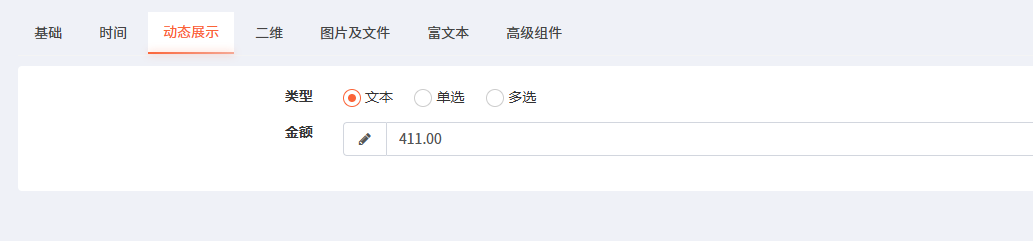
$form->radio("level","类型")->options(["文本","单选","多选"])->when(0,function (Form $form){
                $form->text("money", "金额")->autoWidth();
            })->when(1,function (Form $form){
                $form->selectTable("user_id", "用户")
                    ->controller("Cusertable")->title("选择用户")->asynModel("id", "nickname", "user");
            })->when(2,function (Form $form){
                $form->multipleSelectTable("user_id_list", "多用户")
                    ->controller("Cusertable")->title("选择用户")->asynModel("id", "nickname", "user");
            });
显示共同组件
php
$form->radio("level","类型")->options(["文本与开关","选择器与开关","文本"])->when("in",[0,1],function (Form $form){
            $form->switch("level2", "开关");
        })->when(1,function (Form $form){
            $form->select("level3","等级")->options(["等级1","等级2","等级3"]);
        })->when("in",[0,2],function (Form $form){
            $form->textarea("textarea", "文本块");
        });
多选组件
支持的类型:checkbox,multipleSelect,checkboxButton,checkboxCard
php
 $form->checkbox("level_select","类型")->options(["文本与开关","选择器与开关","文本"])->when("oneIn",[0,1],function (Form $form){
            $form->switch("level4", "开关");
        })->when("oneIn",[1],function (Form $form){
            $form->select("level5","等级")->options(["等级1","等级2","等级3"]);
        })->when("oneIn",[0,2],function (Form $form){
            $form->text("text", "文本");
        });
whenField 使用说明
功能概述
新增了 whenField() 方法,用于在不改变布局的情况下控制字段的显示/隐藏:
- 满足条件时显示字段
- 不满足条件时隐藏字段
- 布局保持不变
与 when() 的区别
| 方法 | 布局影响 | 适用场景 |
|---|---|---|
when() | 字段被包裹在 cascade-group div 中,布局会改变 | 需要一组字段一起显示/隐藏 |
whenField() | 布局不变,只是控制现有字段的显示/隐藏 | 需要控制单个或多个分散字段 |
使用方法
php
// 基本用法:当 is_test = 1 时显示 test4,否则隐藏
$form->radio('is_test', '是否开启测试')
    ->options(['0' => '否', '1' => '是'])
    ->whenField(1, 'test4');

// 多个字段:当 is_test = 1 时显示 test3 和 test4,否则隐藏
$form->radio('is_test', '是否开启测试')
    ->options(['0' => '否', '1' => '是'])
    ->whenField(1, ['test3', 'test4']);

// 使用操作符:当 type > 1 时显示 test4,否则隐藏
$form->radio('type', '类型')
    ->options(['1' => '类型1', '2' => '类型2'])
    ->whenField('>', 1, 'test4');
完整示例
php
$form->radio('is_test', '是否开启测试')
    ->options(['0' => '否', '1' => '是'])
    ->whenField(1, ['test3', 'test4']); // is_test = 1 时显示 test3 和 test4,否则隐藏

$form->text('test1', '测试1');
$form->text('test2', '测试2');
$form->text('test3', '测试3');
$form->text('test4', '测试4');
支持的操作符
| 操作符 | 说明 |
|---|---|
= | 等于(默认) |
> | 大于 |
= | 大于等于 |
| ` |